How to withdraw your ticket sales from Stripe to your bank
Last updated at: Oct 24, 2026Your ticket money goes straight into your own Stripe account, and Stripe sends it to your bank. Unless you've changed it, that happens automatically every business day. To withdraw on your own terms, sign in to your Stripe Dashboard, open Balances and click Pay out. TixFox never holds your money, so there's nothing to request from TixFox.
Open your Stripe Dashboard
- In TixFox, go to Settings and open the Payment Method tab.
- Under Connected Accounts, click your Stripe account ID, the blue code that starts with
acct_. - Your Stripe Dashboard opens in a new tab. Sign in with your Stripe email and password.
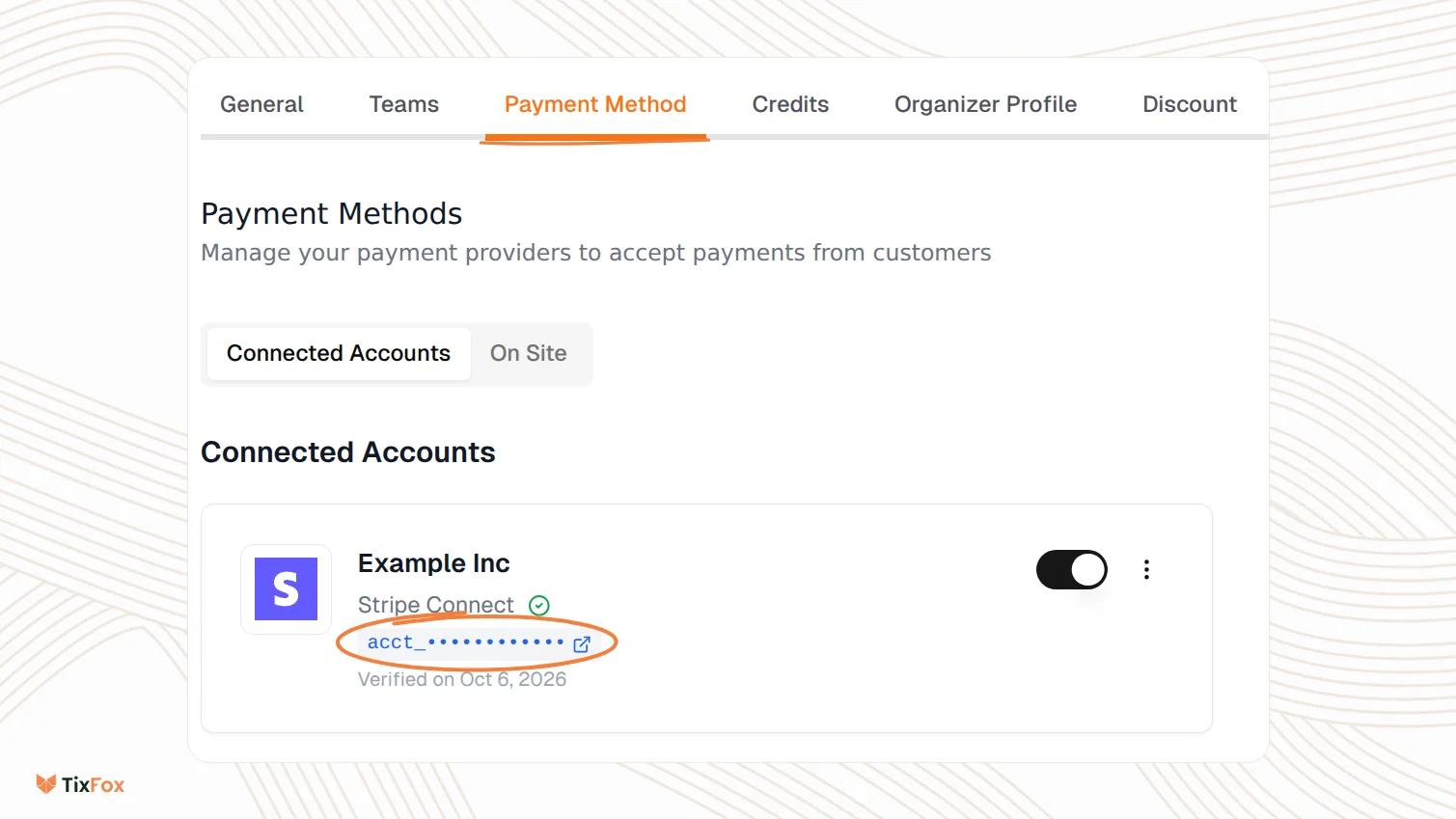
You can also go straight to dashboard.stripe.com, or use the Stripe Dashboard app on your phone.
Three ways to get paid
| Option | Speed | Cost |
|---|---|---|
| Automatic: Stripe sends your available balance every business day, or on the days you pick | On your schedule | Free |
| Manual: you choose when and how much, with Pay out | In the US, usually within 1 business day | Free |
| Instant Payout: to an eligible debit card or bank account, any day | Usually within 30 minutes | In the US, 1.5% (minimum 50¢) |
Send a payout yourself
To pick the day and the amount, set your payout schedule to Manual first (see the next section). Your available balance then stays in Stripe until you send it.
- In the Stripe Dashboard, open Balances.
- Click Pay out.
- If Stripe offers a choice, pick Standard. Instant is covered below.
- Enter the amount. You can send up to your available balance.
- Choose the balance and the bank account the money goes to.
- Click Review, check the details, then confirm the payout.
In the US, a manual payout usually reaches your bank within 1 business day. Send it before 5 pm Eastern and it can arrive the same day.
Change your payout schedule
- In the Stripe Dashboard, open your payout settings.
- Choose Daily, Weekly, Monthly or Manual. For weekly or monthly payouts, pick the days, for example Mondays and Thursdays, or the 1st and 15th of each month.
- Save your change.
You need admin access to the Stripe account to change payouts. Payouts due on a weekend or holiday arrive the next business day.
Your schedule controls when money is sent, not how soon a sale can be paid out. In the US, card payments are usually ready to pay out 2 business days after the sale.
Get your money in minutes with an Instant Payout
- In the Stripe Dashboard, open Balances and click Pay out.
- Choose Instant.
- The first time, Stripe asks you to add an eligible debit card or bank account. You only do this once.
- Enter the amount, choose the card or account, and click Review to confirm.
- Speed: usually within 30 minutes, any day, including weekends and holidays.
- Cost: in the US, 1.5% of the payout, with a 50¢ minimum. Standard payouts are free.
- Who can use it: new Stripe accounts aren't eligible right away. When you are, Balances shows an amount available for Instant Payouts.
- Limits in the US: $0.50 to $9,999 per payout, up to 10 Instant Payouts a day, and a daily total that Balances shows you.
- Works with any schedule: whatever you don't pay out instantly goes out on your normal schedule.
Your first payout takes longer
On a new Stripe account, the first payout typically arrives 7 to 14 days after your first live payment, depending on your industry, country and risk level. An Instant Payout doesn't skip this wait. If you need ticket money before your event, connect Stripe and open sales early.
Pay out from your phone
In the Stripe Dashboard app, go to the Balances tab, or tap + and choose Pay out funds. Add bank accounts and debit cards on the web Dashboard first, because the app can't add them.
If a payout fails
Your bank sends the money back to Stripe, and Stripe emails you and shows it in the Dashboard. This can take up to 5 business days, so a payout can show as paid and then change to failed.
- Check your bank details in your payout settings. To change them, click Edit next to the bank account.
- Stripe tries again on your next scheduled payout.
- If your bank details were already right, contact your bank. Once it's sorted, click Resume Payouts in Stripe.
Common questions
Can TixFox send my payout for me?
No. Payouts happen in your own Stripe account, so only you, or the admins on your Stripe account, can send them or change the schedule. For timing, see When should I expect my ticket sales payout on TixFox?
Does Stripe charge me to withdraw?
Standard payouts, automatic or manual, are free. Instant Payouts cost 1.5% of the payout in the US, with a 50¢ minimum.
Why can't I pay out my whole balance?
You can only pay out your available balance. New sales stay pending until they're ready, usually 2 business days for US card payments.
Should I leave some money in Stripe?
If refunds are likely, yes. Refunds come out of the same Stripe account. See How to refund a ticket order.
I'm outside the US. Is it the same?
The steps are the same, but timing, limits and fees depend on your country. See Stripe's payouts guide and pricing.